ArtXCloud · 2026
Designing a scalable transaction system for complex art-market workflows
- Product strategy
- 0→1
- Product design
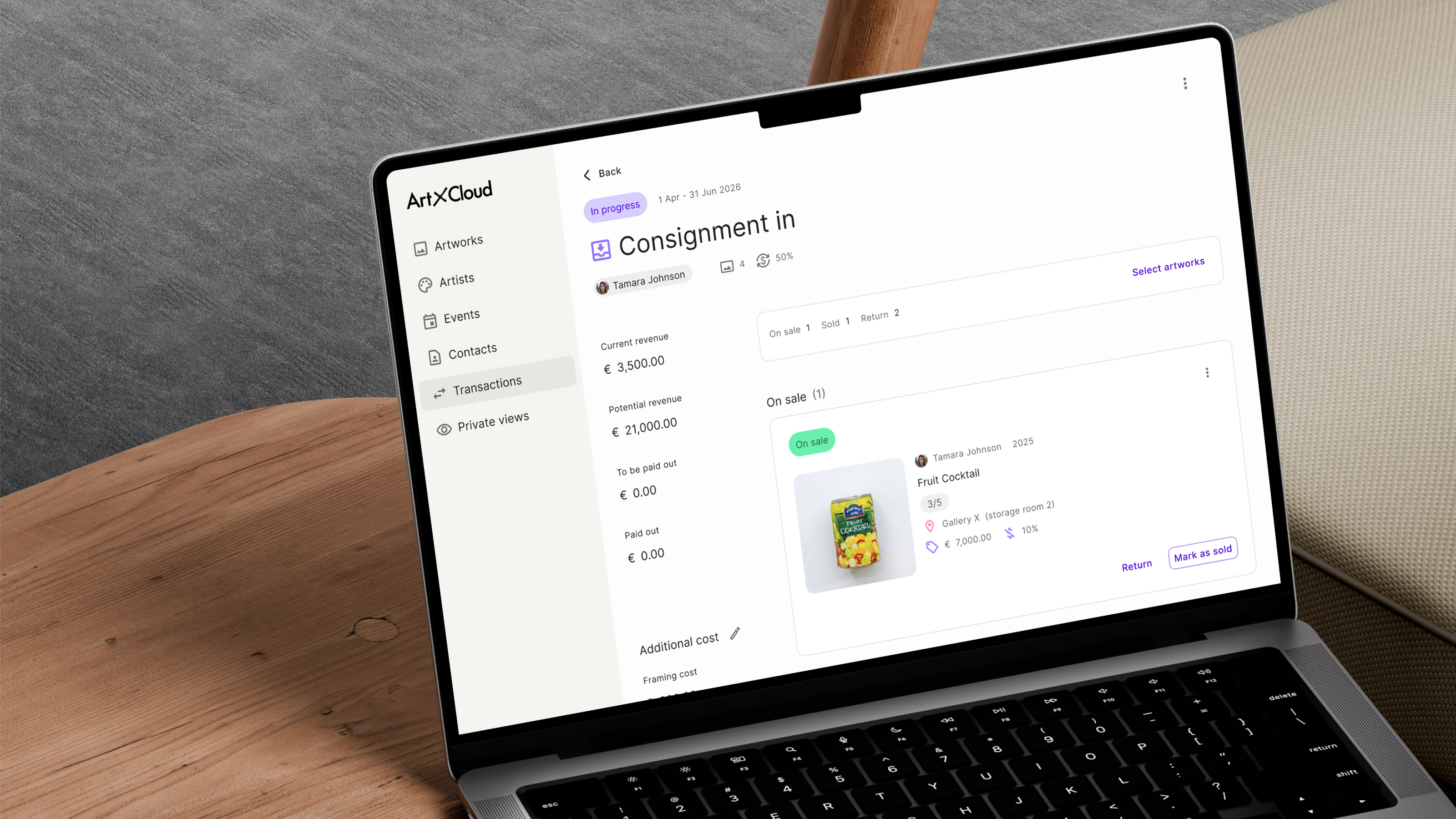
ArtXCloud is a SaaS platform for the art industry: galleries, artists and collectors use it to manage artworks, sales, logistics and reporting in one place.
The platform needed a clearer way to handle artwork transactions between them. In the art market, works often move without being sold: an artist consigns a work to a gallery, which sells it on their behalf, or a work is loaned to a museum for an exhibition. The existing model treated inventory as the main signal: if a work was in stock, it could be sold; if it was not in stock, it could not.
That shortcut broke down as soon as the real art-market cases appeared. It had no way to keep a consignment open while the work moved into sale. It had no way to follow a work through re-consignment across several parties. Inventory was left trying to describe ownership, selling rights, custody and process at the same time.
Outcomes
Misaligned
transaction flow
The previous product experience required too much manual work from users. Its user flow did not match real art-industry workflows, where artworks move through consignment, sale, return and re-consignment in ways that often overlap.
Current issues
Ambiguous inventory status
A single in-stock or out-of-stock flag was the only signal, and it couldn’t say why. The same status was shared by a work that had left the gallery, one away on loan, one reserved for a buyer, and one still free to sell — so no one could tell those situations apart.
Manual availability
Every artwork’s availability had to be switched by hand between in stock and out of stock. Nothing tied it to what was actually happening to the work, so the status drifted out of date, and each fix had to be made one artwork at a time — unmanageable across a large inventory.
Completing this transaction also completes the other 19 artworks in the same consignment.
Disconnected flow
Selling is a natural outcome of consignment, yet a sale can’t begin until the consignment is completed first — an unnatural sequence. And completing it forces every artwork in that consignment to be completed at the same time. For galleries, that made the flow unusable.
Requirements
These issues made it clear that the product needed a transaction model flexible enough to reflect how artworks actually move between people, rights and responsibilities.
-

 Artist
 Gallery
 Collector
Scale as an ecosystem across galleries, artists and collectors, not as isolated gallery-side transaction types.
- Artist Gallery A Gallery B Collector
Support complex overlapping cases, including loan-out from consignment-in and four-party re-consignment.
Breaking down transaction state
The ambiguous inventory status came from one flag trying to describe several things at once. As I worked through the transaction model, I realised that each transaction changed across four dimensions: ownership, selling rights, progress and custody. This changed the design focus from assigning one inventory status to asking what each user needs to understand at each stage of a transaction.
Ownership
Who ultimately owns the artwork.
Selling rights
Who can sell the artwork at this stage.
Progress
Which steps still need to happen.
Custody
Which party the artwork is currently with.
Translating state
into status
That reframing led to a design question: what should each role understand at a glance?
A single artwork could be owned by one party, sellable by another, physically with a third party, and still moving through an unfinished process. So instead of treating status as one label, I designed it as a layered signal that could answer different questions for galleries, artists and collectors.
Gallery
Can I sell this now?
Yes
The work is sellable, with ownership context visible.
No
The status explains why it is not sellable and what comes next.
Artist
What is happening to my artworks?
The artist owns the work, and it is in their studio.
They can see where the work is and whether it sold or will return.
They can see which party currently has the work.
They can understand the final outcome.
Collector
How is the purchasing process going?
The collector can see which purchase step is still open.
The collector can recognise when the process is complete.
Anatomy of the
status chip
Those role scenarios showed that a single label had to carry several things at once — the high-level state, the transaction type, and context specific to each role. So I broke the chip into parts, each handling one of them.
Colour
Shows the high-level state at a glance.
- Green The user can sell the work, or currently owns it.
- Red The user cannot sell the work, even if they are the owner.
- Orange/yellow A process is in motion and the outcome is not yet closed.
- Grey The relationship is finished and the user no longer has active rights in this transaction.
Main label
Shows the transaction type, or Owned when the artwork has no active transaction.
Sub text
Shows the overlapping transaction or contextual detail.
Qualifier
Adds the current state of the overlapping transaction when needed.
Generating status from
transaction state
This also answers the manual availability issue: no one has to switch the status by hand. The status chip is generated from three pieces of information: the user’s role, the transaction type and the transaction progress. The type is selected when a transaction starts or artworks are added, and progress is updated through user actions and recorded steps — so the correct chip can be generated automatically.
Gallery 
Consignment in
In progress
1 Apr - 30 Jun 2026
 Tamara Johnson
 11
 50% €3,500.00
-
 Artwork dispatched by counterparty
- Artwork received
-
 Next steps depend on whether the artwork sells
Stress-testing the model
I stress-tested the model across the cases. It held, including the edge cases: re-consignment, and loan-out from consignment-in. When the counterparty also uses ArtXCloud, it syncs and processes the transaction automatically.
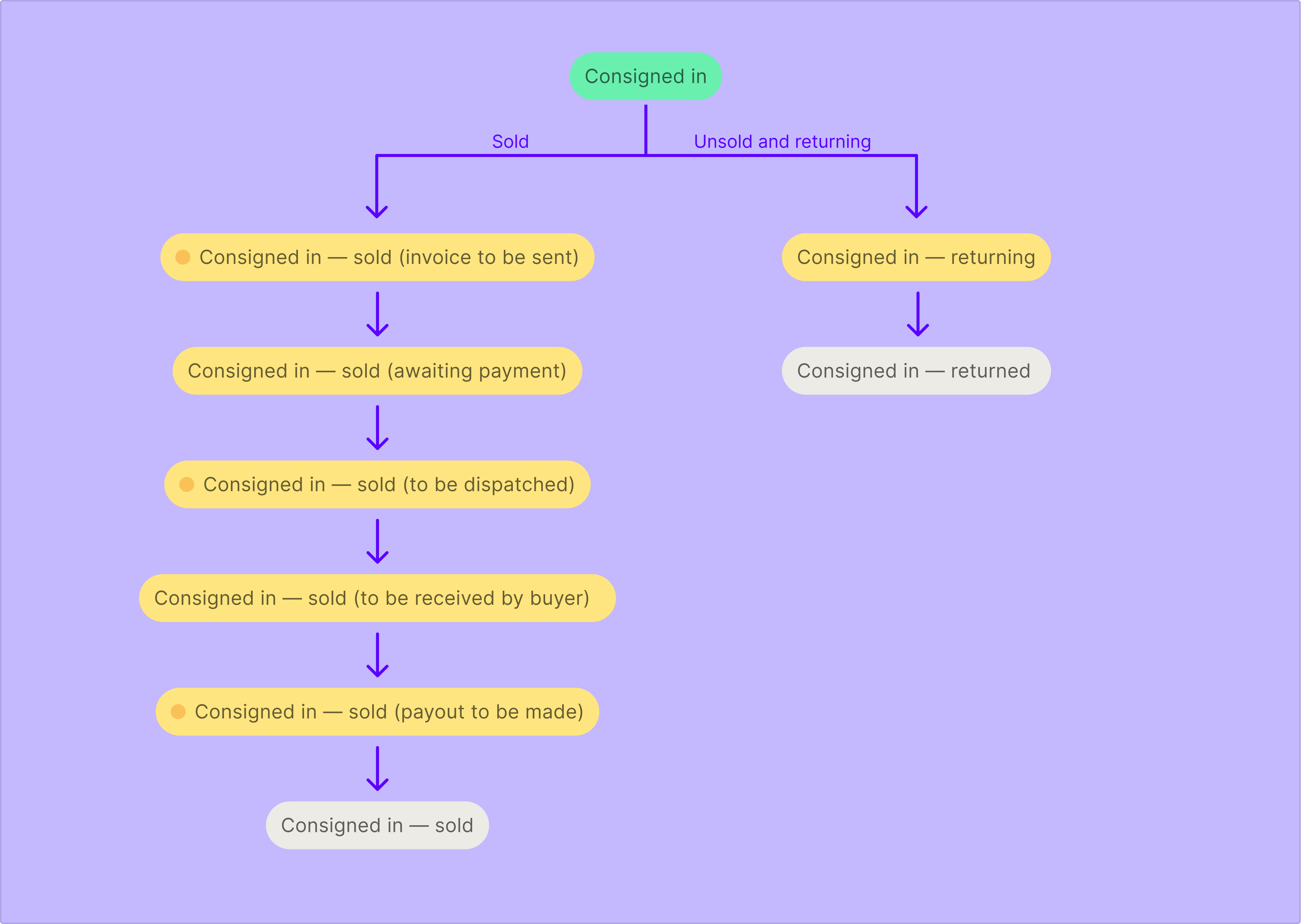
The test also pushed the concept further. One artwork can hold up to two transactions at once. Sold during a consignment-in, it carries both. So a sale can start while the consignment is still open.
Actions at the right level
Consignment-in often contains multiple artworks, but the old product treated the group as if the same action should happen to every work at once.
I redesigned the step model so each action could be taken at the right level. Some steps, such as contract made, belong to the parent transaction because they apply to the whole consignment. Other steps, such as artwork received, can be recorded for an individual artwork or applied from the parent to all artworks when they move together.
A scalable transaction model
I mapped the full flow from creating a consignment to selling works, including what happens to artworks that do not sell.
The map shows each step across transaction pages, transaction overview, artwork pages, artwork detail and artwork overview, so I could check how the same state appears in different parts of the product.
This brought parent actions, artwork-level actions, status labels and CTAs into one concept — a single structure that scales across the ecosystem without a separate system per transaction type.
Highlights
Registering transactions through artwork intake
Users can register a transaction naturally while adding artworks, instead of creating inventory first and repairing the transaction state later.
Independent progress at artwork level
A consignment can hold many artworks under one contract. Each artwork can still be received, sold, or returned on its own, so the gallery can move one work forward without forcing the same step on the rest.
Overlapping real-world transactions
Each artwork can hold up to two active transaction contexts, making it possible to represent sale during consignment, re-consignment, or loan-out from consignment without ending the original transaction first.
Shared actions at transaction level
Steps that apply to every artwork in a transaction, such as sending the invoice, can be completed once from the transaction instead of artwork by artwork.
Status labels that explain what is happening now
Artwork status labels are designed to show what is happening, whether the user is waiting on the other party, and what action they need to take next.
Connected transaction management
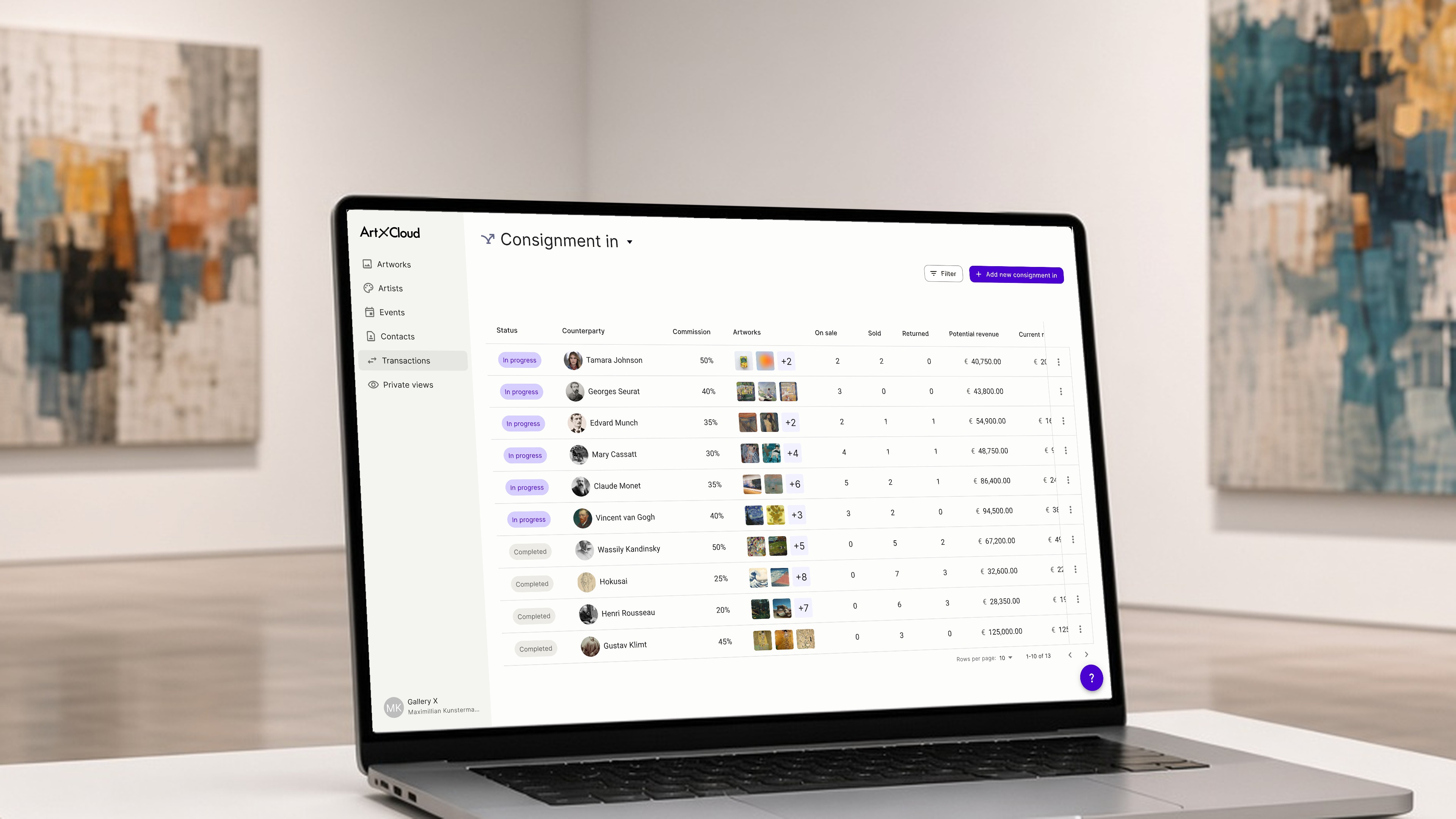
One model covers the transactions that come up in the art industry, including when they overlap. Galleries, artists, and collectors each see the same artwork from their own side, and the status chip makes it easy to recognise what is going on at a glance.
Reflection
The company took the design straight into production. That was the strongest signal the model was clear enough to build: one structure covering consignment, sale, loan and re-consignment, including when they overlap, with status chips generated from role, type and progress instead of hand-toggled inventory.
The trade-off was time. There was no room for user testing, and I would have liked a couple of rounds to see how galleries, artists and collectors read the chips, then refine layouts and information hierarchy. With a short timeline I focused on getting the transaction model right first.
More work

Have a project in mind?
Say hello